Paperless AI printer. Invoices that get paid.
Print from your ERP, POS or CRM to your existing printer. Wonder Smart Printer turns every invoice into one with a payment-link QR, so customers scan and pay on the spot.
- No code integration
- Instant payment alerts
- As fast as same-day deposit
Invoice
INV/2025/06253
15 Dec 2025
- Peanut oil 15L
- $71.04
- Dried shrimp 227g
- $10.24
- Flour 25kg
- $14.08
- Coconut juice ×24
- $20.48
Scan to pay
Payment link
Total
$115.84
Payment received
$115.84 · INV/2025/06253
Keep printing. Start collecting.
Everything you need to turn paper invoices into instant payments — without touching your systems.
No code integration
No coding or manual integration needed. Keep the software and printer you already use.
Print from your ERP, POS or CRM
Hit print as usual. Wonder Smart Printer turns your invoice into one with a payment-link QR, then sends it to your existing printer.
Every invoice on your dashboard
See all uploaded invoices and their payment status in the Wonder dashboard.
Customers scan and pay immediately
Customers scan the QR on the paper invoice and pay on their phone right away.
Instant payment notification
Get notified the moment an invoice is paid. No more chasing or checking bank statements.
As fast as same-day deposit
Funds can reach your account as fast as the same day.
Set up in four steps
- 1
Start Wonder Smart Printer
Open the app on your device. It checks itself and gets ready in seconds.
- 2
Bind your store
Scan the on-screen QR with the Wonder app to link the printer to your business.
- 3
Connect your printer
Pick your existing printer on the same network. Print a test page to confirm.
- 4
Print and get paid
Choose WonderSmartPrinter in any print dialog. The invoice prints with a scan-to-pay QR.
Works with anything that can print
Every invoice, every payment, one dashboard
Each printed invoice appears in your Wonder dashboard with its payment status — paid, awaiting payment or just printed — so you always know who has paid.
- All uploaded invoices in one list
- Instant alert when an invoice is paid
- As fast as same-day deposit
Wonder dashboard
Printed invoices
Wong Shun Hot Pot
INV/2025/06253 · 18:01
$115.84
PaidLucky Noodle Bar
INV/2025/06252 · 17:42
$317.50
Awaiting paymentHarbour Café
INV/2025/06251 · 17:15
$143.36
PaidGolden Dragon Kitchen
INV/2025/06250 · 16:58
$816.00
Printed
See it in action
Setup, binding a store, connecting a printer, printing from a spreadsheet and paying by scanning the QR.
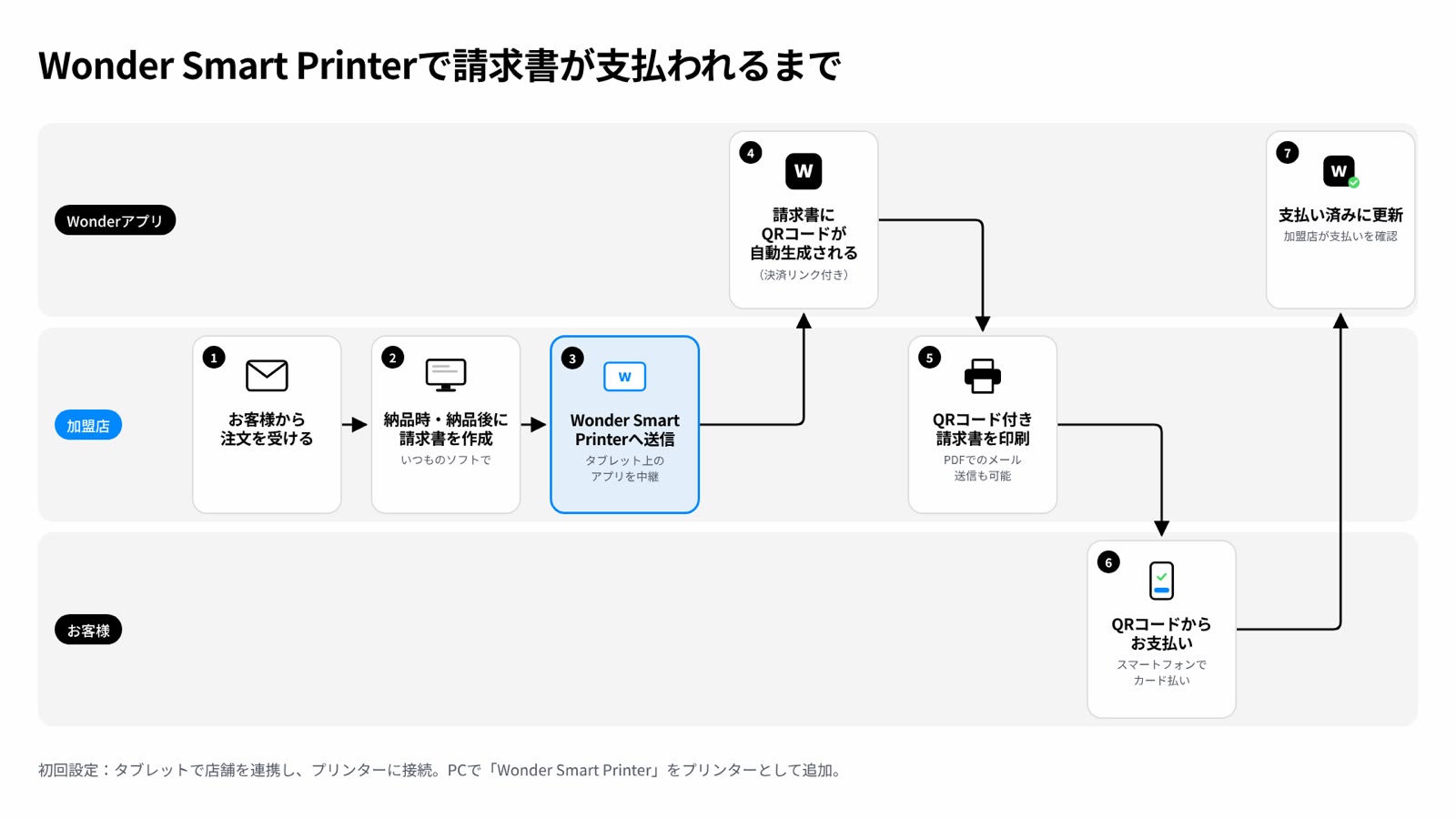
From customer order to paid invoice
- 1Merchant receives the customer's order.
- 2Merchant creates an invoice in their usual software at or after delivery.
- 3The invoice is sent to Wonder Smart Printer through the tablet app.
- 4Wonder automatically adds a QR code linked to the payment page.
- 5Merchant prints the QR invoice or emails it as a PDF.
- 6Customer scans the QR code and pays by card on their smartphone.
- 7Wonder updates the invoice to paid so the merchant can confirm payment.
Initial setup: link your store on the tablet, connect your printer, then add Wonder Smart Printer as a printer on your PC.
Original workflow diagram (Japanese)
Questions
Do I need to change my ERP, POS or CRM?
No. Wonder Smart Printer shows up as a printer. Print the way you do today and the payment QR is added automatically.
Which printers work?
Your existing network printer. Connect it over Wi‑Fi or the local network during setup.
Do my customers need an app?
No. They scan the QR with their phone camera and pay on a secure payment page.
How quickly do I receive the money?
You're notified as soon as the customer pays, and deposits can arrive as fast as the same day.
Turn your next printed invoice into a payment.
No code. No new hardware. Just print.